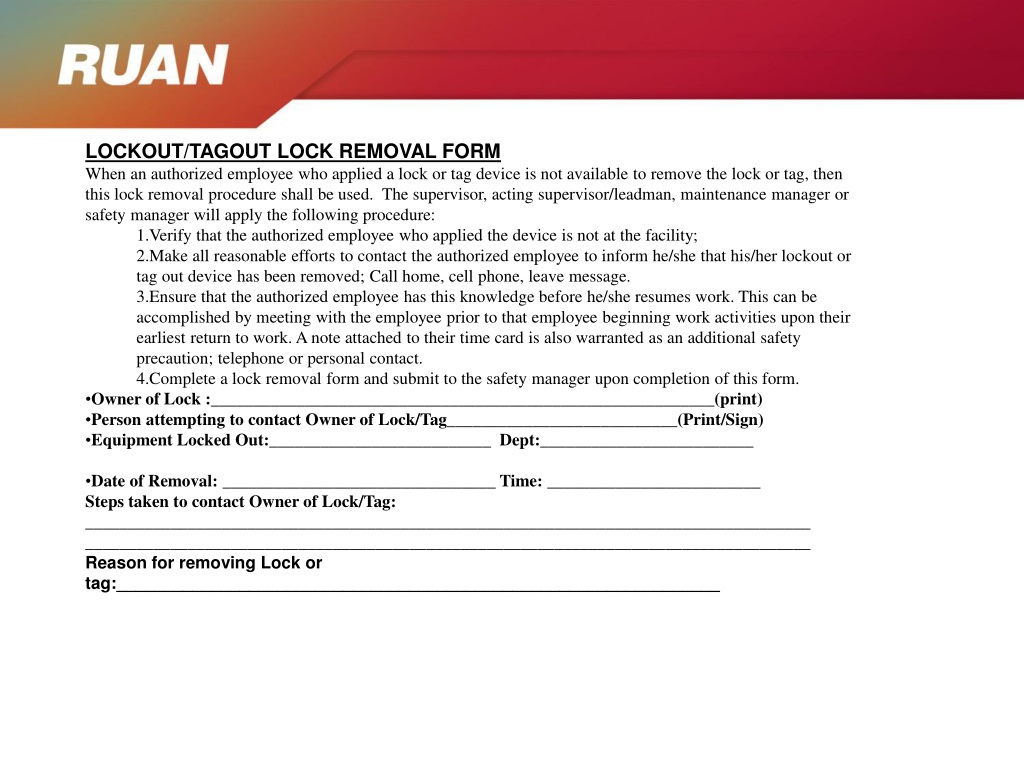
When a machine is locked down under a lockout tagout (LOTO) procedure, only the authorized employee who applied the lock should remove it. But what happens when that person is unavailable? This is where the lockout tagout lock removal form comes in—a formal, documented process to safely and legally remove a lock when the original employee can’t be present.
This form isn’t just paperwork. It’s a critical compliance safeguard that prevents unauthorized re-energization, protects workers from hazardous energy, and satisfies OSHA standards. Without it, companies risk severe penalties, accidents, or fatalities.
Below, we break down every aspect of the lock removal form: its function, legal basis, key components, real-world applications, and common pitfalls.
Why a Lock Removal Form Is Non-Negotiable
Lockout tagout procedures are designed to isolate energy sources during maintenance or servicing. Each authorized employee applies their personal lock and tag to energy-isolating devices. The rule is simple: you lock it, you unlock it.
But complications arise when an employee leaves a shift early, forgets to remove their lock, or—worst case—cannot return due to illness or an emergency. Removing a lock without authorization violates OSHA 1910.147, putting both workers and management at risk.
The lock removal form provides a documented exception pathway. It ensures that:
- The absence of the lock owner is confirmed
- All safety checks are completed before lock removal
- Management and safety officers are involved
- The entire process is traceable and auditable
Without this form, any lock removal becomes guesswork—and guesswork has no place in industrial safety.
Legal Framework and OSHA Requirements
OSHA’s Control of Hazardous Energy standard (29 CFR 1910.147) is clear: locks must only be removed by the employee who installed them, unless a formal, documented procedure is in place for exceptional circumstances.
The lock removal form satisfies this exception. It’s not optional. It’s a compliance requirement for any workplace using LOTO.
Key OSHA expectations include:
- Verification of employee absence – You must confirm the employee is not on-site.
- Notification attempts – Try to contact the employee via phone, supervisor, or HR.
- Systematic energy isolation – Ensure equipment remains de-energized.
- Supervisor authorization – A qualified supervisor must approve removal.
- Documentation – Record the reason, steps taken, and personnel involved.
Failure to follow these steps can result in OSHA fines exceeding $15,000 per violation. More importantly, it increases the risk of catastrophic injury.
Anatomy of an Effective Lock Removal Form
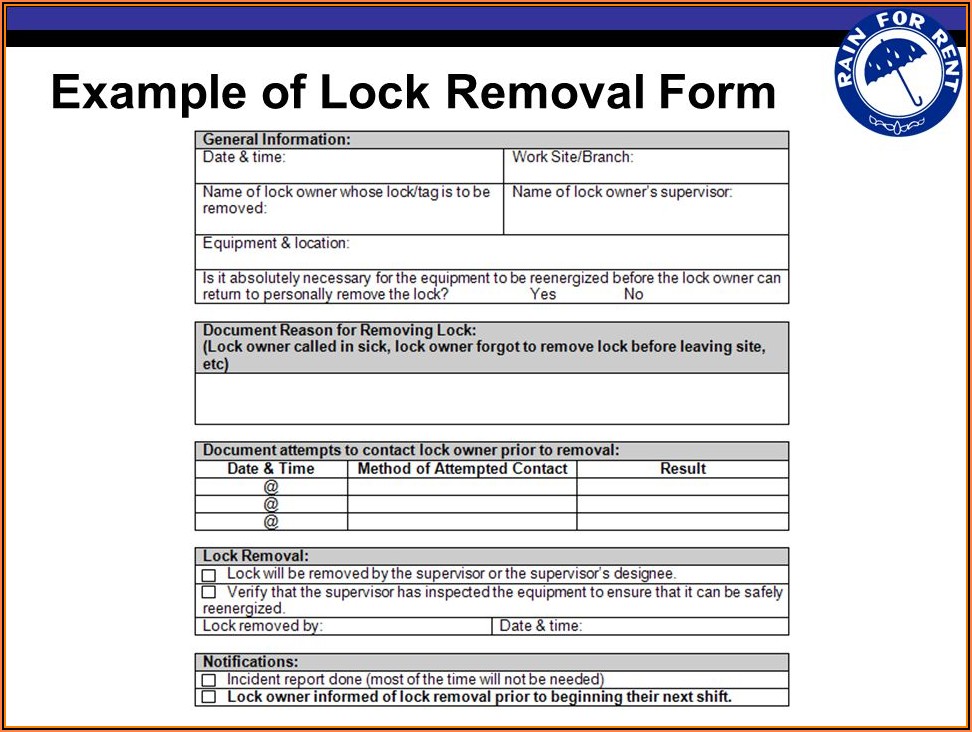
A strong lock removal form isn’t just a signature line. It’s a structured checklist that guides decision-making under pressure. Here’s what every form should include:
1. Equipment Identification
- Machine name
- Location
- Energy sources isolated (electrical, hydraulic, pneumatic, etc.)
2. Lock Details
- Lock ID number
- Tag number
- Date and time applied
- Name and department of the locking employee
3. Removal Justification
- Reason for removal (e.g., employee left site, forgot lock)
- Proof of absence (e.g., time clock record, supervisor confirmation)
4. Verification Steps
- Confirmation that the employee cannot be located
- Attempts made to contact them
- Visual inspection of the work area
- Verification that no one is performing service
5. Authorization Section
- Name and title of authorizing supervisor
- Signature and timestamp
- Witness signature (optional but recommended)
6. Post-Removal Actions
- Method used to re-lock if work continues
- Notification to the original employee
A well-designed form prevents shortcuts. It transforms a potentially dangerous exception into a controlled, auditable event.
Real-World Scenarios: When and How the Form Is Used
Case 1: Employee Leaves Early Due to Emergency A maintenance technician applies a lock during a repair but leaves due to a family emergency. The shift ends, and the lock remains. The next shift cannot start the machine.
Solution: The supervisor initiates the lock removal process. They confirm the employee is off-site, inspect the machine to ensure no work is ongoing, fill out the removal form, and authorize removal. The machine is safely re-energized.
Case 2: Forgotten Lock
After Off-Shift Work A contractor performs weekend maintenance and forgets to remove their lock. No one knows the lock belongs to them.
Solution: The lock ID is traced to the contractor’s company. The site safety officer contacts the contractor, confirms the work is complete, and uses the removal form to document the process before unlocking.
Case 3: Miscommunication During Shift Change Two technicians are working in tandem. One removes their lock, but the second’s lock is overlooked during handover.
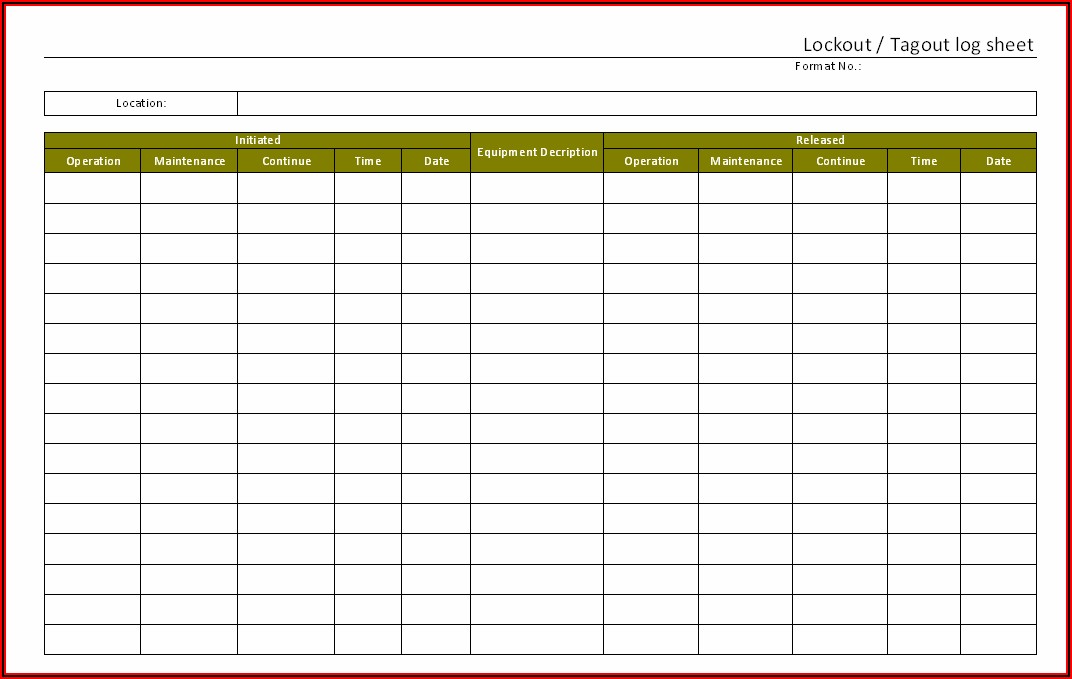
Solution: The incoming shift supervisor finds the lock, halts startup, and checks the log. Using the removal form, they verify the work is complete, contact the lock owner, and proceed only after confirmation.
These examples show that the form isn’t about bureaucracy—it’s about control, clarity, and continuity.
Common Mistakes That Undermine Lock Removal Safety
Even with a form, companies make critical errors that compromise safety:
❌ Assumption Without Verification Removing a lock because “they’re probably done” is never acceptable. Always confirm work completion and absence.
❌ Skipping the Form
Using the form only when “someone notices” defeats its purpose. Every removal must be documented, every time.
❌ Incomplete Information Blank fields, missing signatures, or vague justifications make the form useless during audits.
❌ Unauthorized Sign-Off Only qualified supervisors should approve removal—not coworkers, leads, or maintenance buddies.
❌ No Follow-Up Failing to notify the original employee increases the risk of double-locking or confusion in future maintenance.
The form works only when treated as a mandatory, non-negotiable process—not a formality to rush through.
Best Practices for Implementing a Lock Removal System
1. Standardize the Form Across Sites Use a consistent format company-wide. Include your logo, site name, and form ID for tracking.
2. Integrate with LOTO Procedures The removal form should be part of your master LOTO policy, not a standalone document.
3. Train Supervisors Rigorously Supervisors must understand not just how to fill out the form, but when and why. Include scenarios in training.
4. **Use Digital Forms
When Possible** Paper logs get lost. Digital systems (like EHS software) offer real-time access, automatic alerts, and audit trails.
5. Audit Regularly Review completed forms quarterly. Look for patterns: frequent removals? Missing data? Use findings to improve training.
6. Store Records for at Least One Year OSHA may request documentation during inspections. Digital archives make retrieval fast and reliable.
Digital vs. Paper: Choosing the Right Format
While paper forms are acceptable, digital solutions offer significant advantages:
| Feature | Paper Form | Digital Form |
|---|---|---|
| Accessibility | On-site only | Cloud-based, accessible anywhere |
| Audit Trail | Manual tracking | Automatic timestamps and user logs |
| Error Prevention | Prone to omissions | Required fields, validation |
| Integration | None | Links to LOTO database, work orders |
| Speed of Approval | Slower, physical sign-off | Faster, mobile approvals |
For larger operations or multi-site companies, digital removal forms reduce risk and improve compliance. For small shops with limited tech, a well-designed paper form with a secure logbook works—but must be managed strictly.
5 Critical Elements of a High-Performing Lock Removal Workflow
- Immediate Lock Identification
- Every lock must have a unique ID tied to the employee and procedure.
- Clear Chain of Command
- Define exactly who can authorize removal and under what conditions.
- Verification Protocol
- Include a checklist: Is the employee on site? Is work complete? Is the area clear?
- Documentation in Real Time
- Fill out the form as the process happens—not after.
- Communication Loop
- Notify the original employee as soon as possible after removal.
This workflow turns a potential liability into a model of procedural discipline.
Final Step: Make It Part of Your Safety Culture
The lockout tagout lock removal form should never feel like an exception. It should feel like a natural extension of your energy control program.
Post the form near LOTO stations. Include it in safety meetings. Audit its use like any other critical procedure.
When a lock is stranded, the form isn’t a workaround—it’s the protocol. It keeps your team safe, your operations compliant, and your site free from preventable incidents.
Put the form in place. Train your people. Use it every time. That’s how you turn a rare event into a routine win.
Frequently Asked Questions
What is a lockout tagout lock removal form? It’s a documented procedure used to safely remove a lock when the original employee is unavailable, ensuring compliance with OSHA standards.
Who can authorize lock removal? Only a qualified supervisor or authorized person designated by the employer, following a verified process.
Can I remove someone else’s lock without a form? No. Removing a lock without following the formal removal process violates OSHA regulations and creates serious safety risks.
How long should completed forms be kept? At minimum, one year. Longer retention is recommended for audit and incident investigation purposes.
What if the employee returns after their lock is removed? They must be notified immediately. If work was ongoing, they should re-apply their lock after verifying conditions.
Do contractors need to use the same form? Yes. All workers, including contractors, must follow the site’s lock removal procedure.
Can digital forms replace paper ones? Yes, and they often improve accuracy, accessibility, and audit readiness.
FAQ
What should you look for in Lockout Tagout Lock Removal Form: What You Need to Know? Focus on relevance, practical value, and how well the solution matches real user intent.
Is Lockout Tagout Lock Removal Form: What
You Need to Know suitable for beginners? That depends on the workflow, but a clear step-by-step approach usually makes it easier to start.
How do you compare options around Lockout Tagout Lock Removal Form: What You Need to Know? Compare features, trust signals, limitations, pricing, and ease of implementation.
What mistakes should you avoid? Avoid generic choices, weak validation, and decisions based only on marketing claims.
What is the next best step? Shortlist the most relevant options, validate them quickly, and refine from real-world results.